

When you need a simple way to check on your dog without spending much, the right budget dog camera can make daily life easier. A basic camera helps you see and sometimes talk to your pet, detect unusual activity, and verify they are safe while you are away. This guide covers the top shortlisted budget cameras that balance usable video quality, dependable connectivity, and straightforward controls. We focus on features that matter for everyday pet monitoring and highlight what to expect from affordable options. Read on to find budget-friendly cameras that fit your routine and home setup.
Top Picks at a Glance
| Best Overall Budget Camera Our top all-around budget-friendly camera for most pet owners | Tapo C100 Indoor Security Camera |  |
| Best Budget Budget Camera The lowest-cost option that still covers basic pet-monitoring needs | Cinnado D1 2K Indoor Camera |  |
| Best Compact Budget Camera A smaller, space-saving camera for discrete indoor placement | Blink Mini 2K+ Camera |  |
| Best Night-Vision Budget Camera Strong low-light performance to keep tabs on pets after dark | Tapo EC70 Pan/Tilt Camera |  |
| Best Two-Way Audio Budget Camera Built-in mic and speaker for live talkback with your pet | Tapo C200 Indoor Pan/Tilt Camera | 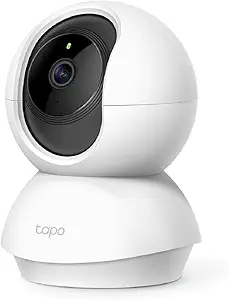 |
| Best Wireless Budget Camera Cord-free or battery-capable cameras for flexible placement | Arenti P2Q Pet Camera 4MP |  |
| Best Premium Budget Camera A higher-quality pick within the budget category for extra performance | eufy Indoor Cam E30 |  |
Tapo C100 Indoor Security Camera
Best Overall Budget Camera

| Video Capture Resolution | 1080p |
|---|---|
| Night Vision Range | 30 feet |
| Connectivity Technology | Wireless |
| Wireless Technology | 2.4GHz Wi-Fi |
| Storage | microSD up to 512 GB / Cloud |
The Tapo C100 is a compact wired indoor camera designed for continuous pet or baby monitoring. It records 1080p video to a microSD card or the cloud and sends instant push alerts when motion, a person, or baby crying is detected, so you can know when your dog is active or needs attention. The camera includes two-way audio with a built-in siren to comfort pets remotely or deter unwanted activity, and infrared night vision rated to about 30 feet lets you see clearly after dark. Setup uses 2.4 GHz Wi-Fi and the Tapo mobile app, which supports scheduling, multiple-camera views, and voice display via Alexa or Google Assistant. Frame rate is modest at 15 fps, and the camera is corded only, so placement needs a nearby outlet and the footage is not as smooth as higher-frame models, but the combination of reliable alerts, local SD storage up to 512 GB, and easy app controls makes it a strong budget option for everyday pet monitoring.
Best for: Buyers who want an affordable, dependable indoor pet camera that prioritizes clear daytime video, reliable motion alerts, and simple app control for everyday monitoring.
Less Ideal for: People who need completely wireless placement, ultra-smooth high-frame video for fast action, or outdoor/weatherproof monitoring should consider other models.
- 1080p FHD video for clear indoor monitoring
- Two-way audio with built-in siren to communicate with or deter pets
- Motion, person, and baby-cry detection with instant push alerts
- Night vision up to 30 feet for reliable low-light monitoring
- Supports local microSD storage up to 512 GB and optional cloud subscription
- Wired power only which requires a nearby outlet and limits placement
- Frame rate is 15 fps so motion can appear less smooth than higher-end cameras
Verdict: The best overall budget camera that balances image quality, features, reliability, and ease of use for everyday pet monitoring.
Cinnado D1 2K Indoor Camera
Best Budget Budget Camera

| Video Capture Resolution | 2k |
|---|---|
| Field Of View | 320 degrees |
| Connectivity Technology | Wi‑Fi (2.4 GHz only) |
| Memory Storage Capacity | 128 GB max |
| Power Source | Corded Electric |
The Cinnado D1 is a budget indoor security camera aimed at basic home monitoring for pets, babies, and general room security. It streams 2K video and offers pan and tilt control so you can sweep a room from the phone app for near 360 degree coverage, and the camera includes night color vision for low-light use. Setup is app-driven over 2.4 GHz Wi-Fi and the camera runs continuously on corded power. Two-way audio lets you call to your pet or family and motion detection triggers short recorded clips plus push notifications and an optional siren. Storage works either via a microSD card (up to 128 GB) or encrypted cloud plans, and multiple users can view the feed simultaneously. Trade-offs are predictable for the price: it needs constant power, only supports 2.4 GHz Wi-Fi, and initial setup recommends placing the camera close to your router, which could limit placement in larger homes. For buyers who want basic, reliable monitoring without a high cost, the D1 delivers solid core functionality.
Best for: Buyers on a tight budget who want a dependable indoor pet camera with acceptable 2K video, basic motion alerts, and two-way audio for checking on and talking to pets remotely.
Less Ideal for: Users who need cordless placement, 5 GHz Wi-Fi support, or professional-grade analytics and long-term cloud recording without a subscription should look elsewhere.
- 2K video resolution for clearer live view and clips
- Pan and tilt with wide coverage so a single camera can monitor most of a room
- Two-way audio to talk to pets or family from the app
- Supports local microSD storage up to 128 GB plus optional encrypted cloud backup
- Motion detection with push alerts and short auto-recorded clips
- Requires constant power and is not battery operated
- Only works on 2.4 GHz Wi-Fi which can restrict placement and modern network setups
- Setup guidance recommends being within 3 feet of the router during pairing
Verdict: The best budget budget camera for buyers prioritizing the lowest price while still getting acceptable video, basic motion alerts, and dependable operation.
Blink Mini 2K+ Camera
Best Compact Budget Camera

| Video resolution | 2K |
|---|---|
| Zoom | Up to 4x |
| Audio | Two-way with noise cancellation |
| Includes | Camera, mounting kit, USB cable, power adapter |
The Blink Mini 2K+ is a small plug-in camera designed for straightforward home and pet monitoring where space is limited. It records sharper 2K video with up to 4x zoom so you can pick out more detail from a distance, and its improved audio with noise cancellation makes two-way talk more usable for calling pets or communicating with caretakers. The camera mounts or sits on a shelf and pairs with the Blink app for motion alerts and clip saving; person and vehicle detection are available with an optional subscription. Setup is quick using the included power adapter, USB cable, and mounting kit, and the unit can act as a plug-in chime for a Blink doorbell. Important limitations are that continuous local storage is not included and some advanced detection and cloud storage features require a paid Blink plan, and outdoor use needs a separate weather-resistant power adapter. For buyers who want a modest, easy-to-place indoor camera for basic pet monitoring, the Mini 2K+ delivers clear video and usable two-way audio in a tiny package.
Best for: Buyers who need a tiny, unobtrusive indoor camera to monitor pets or small rooms and prioritize clear video and usable two-way audio over continuous local recording.
Less Ideal for: People who need built-in continuous local storage, full-featured free detection, or a fully weatherproof outdoor camera.
- Compact plug-in design fits in tight indoor spaces or mounts discreetly
- 2K video resolution with up to 4x zoom for clearer detail than typical 1080p cams
- Improved two-way audio with noise cancellation for clearer conversations
- Quick setup with included mounting kit, USB cable, and power adapter
- Integrates with Alexa and can act as a plug-in chime for Blink doorbell
- Advanced person and vehicle detection and cloud storage require a paid Blink subscription
- Not weatherproof out of the box for outdoor placement without an additional adapter
Verdict: The best compact budget camera for owners who need a small, unobtrusive unit that fits tight spaces without sacrificing essential monitoring features.
Tapo EC70 Pan/Tilt Camera
Best Night-Vision Budget Camera

| Video Capture Resolution | 1080p |
|---|---|
| Frame Rate | 15fps |
| Viewing Angle | 120 degrees |
| Night Vision Range | 30 feet |
| Flash Memory Type | Micro SD |
The Tapo EC70 is an indoor pan/tilt camera designed for everyday monitoring of rooms, pets, and kids. It streams 1080p HD video to your phone and compatible Alexa or Google Assistant displays, and its pan/tilt mechanics plus 120 degree viewing angle let you scan a room or follow motion. Night Color night vision reaches up to about 30 feet, so you can still see pets and activity in low light rather than a monochrome blob. The camera includes two-way audio for talking to pets, motion detection with tracking so the camera follows movement, and a patrol mode that cycles preset viewpoints. Storage is flexible: continuous local recording to a MicroSD card up to 256 GB avoids mandatory cloud fees, while optional cloud plans add history features. Expect a 15 fps stream rather than high-frame-rate video, and placement requires wired power and a 2.4 GHz Wi‑Fi network, so it is best for fixed indoor locations near an outlet. For the price this camera delivers useful, usable nighttime footage and practical pet-monitoring features without subscription dependence.
Best for: Buyers who want an affordable indoor pet camera that captures clear night-time detail and keeps footage locally without required cloud fees.
Less Ideal for: People who need high-frame-rate surveillance for fast action or a battery-powered/cable-free camera for flexible placement.
- 1080p HD live stream for clear daytime viewing
- Night Color night vision up to 30 feet for usable low-light footage
- Pan/tilt and motion tracking let the camera follow pet movement
- Local MicroSD recording up to 256 GB without mandatory subscription
- Two-way audio to interact with pets remotely
- Frame rate is 15 fps which can make fast motion look slightly choppy
- Requires wired power and 2.4 GHz Wi‑Fi so not fully cordless
Verdict: The best night-vision budget camera for pet owners who need clear, usable nighttime footage and reliable motion detection in low light.
Tapo C200 Indoor Pan/Tilt Camera
Best Two-Way Audio Budget Camera

| Video Capture Resolution | 1080p |
|---|---|
| Night Vision Range | 30 feet |
| Video Encoding | H.264 |
| Connectivity Technology | Wi‑Fi |
| Max MicroSD Capacity | 512 GB |
The Tapo C200 is an affordable indoor pan/tilt security camera designed for continuous home monitoring and two‑way interaction. It streams 1080p video over 2.4 GHz Wi‑Fi and can rotate across a full 360° horizontal and 114° vertical field to cover an entire room. In everyday use you set the camera on a tabletop or mount it, connect it in the Tapo app, and receive motion notifications with optional motion tracking and a built‑in siren. Two‑way audio is full duplex so you can hear your pet and talk back in near real time, and night vision extends visibility up to about 30 feet for overnight checks. Recordings can be saved to a microSD card up to 512 GB or through Tapo Care cloud plans. Limitations to note are a modest 15 fps frame rate and requirement for a 2.4 GHz network, and it is not weather resistant so it is strictly for indoor use. For the price it delivers reliable video, responsive audio, and wide coverage that make it useful as a pet or baby monitor.
Best for: People who want an inexpensive indoor camera that reliably lets them hear and speak to a pet from anywhere and monitor a whole room without a complex setup.
Less Ideal for: Users who need outdoor weatherproof cameras, multi‑camera professional surveillance, or the highest frame rates for fast motion capture.
- Clear 1080p video with pan/tilt for wide room coverage
- Full‑duplex two‑way audio for listening and speaking to pets in real time
- Night vision effective up to about 30 feet for overnight monitoring
- Supports local microSD storage up to 512 GB plus optional cloud plan
- Simple app setup and compatibility with Alexa and Google Assistant
- Requires 2.4 GHz Wi‑Fi and will not work on 5 GHz‑only networks
- 15 fps frame rate is lower than higher‑end models
Verdict: The best two-way audio budget camera for owners who want to listen to their pet and speak to them remotely with clear, responsive audio.
Arenti P2Q Pet Camera 4MP
Best Wireless Budget Camera

| Video Capture Resolution | 4 MP |
|---|---|
| Connectivity Protocol | Wi-Fi |
| Night Vision Range | 32 feet |
| Flash Memory Supported Size Maximum | 256 GB |
| Alert Type | Audio and Motion |
The Arenti P2Q is an indoor pet camera designed for straightforward home monitoring. It streams up to 4MP video over 2.4GHz and 5GHz Wi‑Fi and uses pan/tilt auto tracking to follow activity in a room, while the Arenti app provides live view, motion and sound alerts and optional web access. Notable features include AI human/motion detection to reduce false alerts, two‑way audio for calling pets, night color vision to see activity in low light, and local Micro SD storage up to 256GB so you can record without a subscription. Setup is simple using the app and the camera includes a mount, screws and power adapter, but it is a corded device so truly cable‑free placement is limited by power availability. Video uses H.265 encoding for efficient streaming and the wide feature set is a good match for basic pet monitoring, though manual focus and a 95 degree viewing angle mean you may need to rely on pan/tilt to cover larger rooms.
Best for: Buyers who want an affordable indoor pet camera with reliable Wi‑Fi streaming, simple app setup, and local recording options for everyday monitoring without a subscription.
Less Ideal for: People who need a battery‑powered, truly cable‑free camera or those seeking ultra‑wide fixed‑angle coverage without relying on pan/tilt movement.
- High 4MP (2.5K) resolution for clearer live video and recordings
- Supports both 2.4GHz and 5GHz Wi‑Fi for more flexible wireless placement
- Pan/tilt with AI auto tracking captures motion across the room
- Two‑way audio lets you speak to pets and built‑in speaker/mic enable real‑time interaction
- Local Micro SD storage up to 256GB so recording is possible without a paid cloud plan
- Requires mains power so cannot be placed completely cable‑free
- Viewing angle is modest at 95 degrees so full coverage depends on pan/tilt movement
Verdict: The best wireless budget camera for people who need easy, cable-free placement and reliable Wi‑Fi connectivity for monitoring without complicated installs.
eufy Indoor Cam E30
Best Premium Budget Camera

| Video Capture Resolution | 4k |
|---|---|
| Viewing Angle | 360 degrees |
| Control Method | App |
| Power Source | Corded Electric |
| Night Vision | Night Color |
The eufy Indoor Cam E30 is a corded indoor dome camera designed for continuous home monitoring and pet or baby watching. It records at 4K and provides a panoramic 360 degree pan-and-tilt view, letting you sweep a room from the app and use Quick Focus Tap to jump to areas of interest. On-device AI detects people, pets, crying and audio cues and can auto-track movement so you do not miss activity. The camera includes two-way audio for check-ins, color night vision with an integrated spotlight for better low-light detail, and local storage options to avoid monthly fees. It works with HomeKit, Alexa and Google Assistant, though HomeKit limits resolution to 1080p. Practical compromises include the need for a constant power connection and support only for 2.4 GHz Wi-Fi, which may affect placement and network choices. For buyers who want sharper footage and robust features without subscribing to cloud plans, this camera delivers a premium feel inside a budget-oriented price range.
Best for: Buyers who want noticeably better image quality and smart features than basic budget cameras while still staying within an affordable price band, especially for monitoring pets or home activity.
Less Ideal for: Users who need battery-powered or true wire-free placement options or who require 5 GHz Wi-Fi support for high-density networks.
- True 4K capture for clearer, more detailed video than typical budget cams
- 360 degree pan and tilt with Quick Focus Tap for full-room coverage
- On-device AI that recognizes people, pets, crying and auto-tracks detected subjects
- Color night vision plus an integrated spotlight for better nighttime detail
- Local storage option and no required monthly subscription
- Requires continuous power so placement is limited to where a plug is available
- Only supports 2.4 GHz Wi-Fi which may limit network performance in crowded environments
Verdict: The best premium budget camera for buyers willing to spend a bit more inside the budget segment to get better build quality, sharper video, and stronger features.
Choosing the Right Budget Dog Camera: Key Factors to Consider
Video Resolution and Frame Rate
Clear video is the most direct way to tell what your dog is doing. Higher resolution and a steadier frame rate help you spot small details such as whether a dog is chewing a toy, pacing, or resting. On budget cameras, balance expectations: many deliver acceptable 720p or 1080p streams but may downscale during low bandwidth.
Frame rate affects motion clarity. Lower frame rates can make active dogs look blurry, which reduces the camera's usefulness for monitoring sudden behaviors. Look for cameras that maintain a reasonable frame rate at your home Wi-Fi speeds to avoid frustrating lag or choppy playback.
Connectivity and App Reliability
A camera is only useful when you can actually view its feed. Stable Wi-Fi connection, a responsive mobile app, and reliable push notifications are essential for pet monitoring. Features such as quick reconnect after network interruptions and clear status indicators in the app reduce the chances you miss an event.
Consider whether the app requires frequent re-authentication or has reports of crashes. Budget models sometimes trade advanced cloud features for simpler, more dependable local streaming, which can be preferable for straightforward monitoring.
Two-way Audio and Microphone Quality
Two-way audio lets you hear your dog and speak to them, which can calm anxiety or interrupt unwanted behavior. Microphone sensitivity and speaker clarity vary; muffled audio makes communication ineffective. For homes with background noise, better microphone pickup means you can still hear whines or barks.
Also consider echo suppression and latency. Low-latency audio feels more natural when you're trying to soothe a dog, while poor echo control can make conversations confusing.
Night Vision and Low-light Performance
Dogs are active at different times, and many rooms have low light at night. Infrared night vision or good low-light sensors ensure you can still see your pet clearly after dark. Some budget cameras use IR LEDs that produce a monochrome image; others attempt color low-light enhancement, which may be less effective.
Check whether night mode activates automatically and whether there is significant noise or grain in the image. Acceptable low-light performance means you can confirm location and general behavior even without full-color detail.
Power Options and Placement Flexibility
How you power the camera affects where you can put it. Cameras that require a constant outlet offer continuous monitoring but may limit placement. Battery-powered models give placement freedom but require periodic charging or battery swaps, and runtime can be shorter when motion detection or two-way audio are used frequently.
Consider whether the camera includes mounting hardware, a magnetic base, or a flexible stand. Placement flexibility matters for achieving a good field of view of the dog's primary spaces while keeping the unit out of reach of curious pets.
Storage Options and Privacy Controls
Decide whether you need continuous cloud recording, event-based clips, or local storage. Many budget cameras provide basic cloud clips or microSD card support. Local storage keeps video within your home network, which some owners prefer for privacy, while cloud services may offer easier remote access and off-site backup.
Also review account security features such as two-factor authentication and clear privacy settings. Budget products sometimes have limited privacy controls, so prioritize devices that at least let you manage recordings and access permissions.
How Much Video Quality Do You Really Need for Dog Monitoring?
Many owners assume higher resolution is always better, but the right balance depends on how you intend to use the camera. If you mainly want to check that your dog is safe and see general activity, a dependable 720p or 1080p stream is usually sufficient. Higher resolutions help when you need to read small details, but they demand more bandwidth and storage.
Also factor in network constraints. A camera that drops resolution to keep a stable connection can be more useful than one that promises 4K but frequently buffers. For most homes, consistent playback and reliable motion alerts are more valuable than ultra-high resolution.
- Use 1080p for clearer still checks and easier identification of small behaviors
- Prefer consistent frame rates over occasional higher resolution that buffers
- Consider how resolution affects storage needs if you plan to record frequently
Can a Budget Camera Capture Separation Anxiety Behaviors?
Budget cameras can effectively record pacing, whining, and destructive behavior if positioned and configured correctly. Place the camera to cover the dog's usual resting and activity areas, and enable continuous recording or frequent motion-triggered clips during times the dog is alone.
Audio capability helps verify distress vocalizations, while motion sensitivity settings reduce false positives from minor lighting changes. For ongoing behavioral monitoring, combine regular video checks with note-taking to track patterns over days rather than relying on single clips.
- Position camera at dog-level for the clearest view of behavior
- Adjust motion sensitivity to avoid excessive false alerts from shadows
- Use two-way audio sparingly to avoid startling the dog
What Do You Need to Know About Installation and Placement?
Installation should be straightforward for a budget camera. Verify the camera's power requirements and whether the included cable length or mounting kit fits your intended location. Kitchens, hallways, and living rooms each have different lighting and vantage considerations.
Avoid placing cameras too close to windows where backlighting can wash out the image. If you need a wide view, mount the camera higher and angle it down; for close-up behavioral detail, position it lower and centered on the dog's typical area.
- Test placement during the time of day you'll most often check the camera
- Keep cords out of reach to prevent chewing
- Use included mounts or a small shelf for stable positioning
How Do Storage and Alerts Affect Day-to-day Usefulness?
Storage strategy determines how long you can review past events. Continuous recording uses more space, while event-based clips are more storage-efficient. If you rely on alerts, make sure notification settings are tuned so you get meaningful updates rather than a stream of trivial alarms.
Consider whether you want thumbnails or short clips delivered to your phone and whether the system keeps a searchable timeline. Reliable time-stamped clips expedite behavior tracking and simplify sharing with a trainer or sitter.
- Enable event clipping for long absences to save storage
- Tune motion zones to focus on the dog's typical area
- Test alert timing to confirm you receive actionable notifications
Are There Any Common Privacy or Security Concerns?
Even budget cameras can present privacy risks if accounts use weak passwords or lack basic protections. Use strong, unique passwords and enable any available two-factor authentication. Review default sharing settings and disable features that allow public access.
If you prefer local control, pick cameras that support microSD storage or local NAS backup. Keep firmware updated when updates are offered to address security patches that can protect both the camera and your home network.
- Change default passwords immediately after setup
- Disable cloud sharing if you do not need remote access
- Keep firmware current to reduce exposure to known vulnerabilities
How We Chose the Best Budget Dog Camera
We shortlisted budget dog cameras by focusing on practical performance attributes that affect everyday pet monitoring. Our evaluation prioritized video quality for identifying pet behavior, stable wireless connectivity, and simple mobile app controls so owners can check in quickly. We also considered night-vision capability for low-light rooms, two-way audio for calming interactions, and durable mounting or placement options for typical household use. Power method and battery life were reviewed to ensure reasonable runtime or convenient continuous power. Privacy and basic security features, such as account authentication and optional local storage, were included as part of the selection criteria. Excluded from consideration were premium-focused models with advanced smart-home integrations or niche specialty cameras that substantially exceed the budget category. We filtered out cameras with consistently poor reviews for connectivity or unclear video performance. The final picks are devices that meet measured baseline expectations for reliability and usability while remaining cost-conscious.
Our full evaluation process is outlined in our review methodology.
FAQ
Will a budget camera show my dog clearly at night?
Many budget cameras include infrared night vision that provides a monochrome image suitable for confirming location and activity. Night performance varies, so expect some grain and lower detail after dark; however, you should still be able to tell whether the dog is resting or moving.
Can I use a budget camera without a paid cloud plan?
Some budget models offer basic free cloud clips or local microSD storage so you can avoid subscription fees. Others limit features without a plan. Check whether local recording is supported if you prefer to keep footage on-site rather than paying for cloud retention.
How do I avoid constant false alerts from motion detection?
Adjust motion sensitivity and set motion zones where the dog spends time. Reducing the detection area to avoid windows, curtains, or busy walkways cuts down on trivial alerts. Some apps let you define schedules so alerts are only active when you are away.
Is two-way audio useful for calming an anxious dog?
Two-way audio can help soothe some dogs by allowing owners to speak and reassure them. Effectiveness depends on speaker clarity and the dog's reaction to hearing your voice. Use short, calm interactions to avoid confusing or stressing the pet.
How much internet speed do I need for a budget dog camera?
For stable 720p to 1080p streaming, a typical household upload speed of 1 to 5 Mbps per camera is often sufficient, though higher resolution or multiple simultaneous streams require more bandwidth. Strong, stable Wi-Fi coverage where the camera is placed matters as much as raw speed.
Final Verdict
For most pet owners, the best budget dog camera balances consistent video performance, reliable connectivity, and useful audio features rather than packing advanced extras. Prioritize a camera that delivers steady streaming at a resolution that matches your monitoring needs, offers reasonable storage options, and has an app you can depend on. Expect tradeoffs in low-light detail and advanced integrations, but you can still achieve effective day-to-day monitoring by focusing on placement, alert tuning, and basic security settings. With those priorities, you can pick a budget camera that gives clear peace of mind without unnecessary complexity.