

When you need to check on your dog while away from home, the right Wi-Fi dog camera gives you live video, audio interaction, and useful alerts. Choosing the correct camera affects how well you can monitor behavior, respond to issues, and integrate the device into your daily routine. This guide covers seven shortlisted Wi-Fi cameras that meet practical needs for pet owners. We evaluated each option for video quality, ease of use, connectivity reliability, and features that matter for canine care so you can pick the camera that fits your home and habits.
Top Picks at a Glance
| Best Overall Wi‑Fi Camera A well-rounded camera balancing image quality, features, and reliability | Ring Indoor Cam 2nd Gen |  |
| Best Budget Wi‑Fi Camera A low-cost option that covers core pet-monitoring basics reliably | Tapo C100 Indoor Security Camera |  |
| Best Premium Wi‑Fi Camera A higher-end model with advanced sensors and premium build quality | eufy Security Indoor Cam E30 |  |
| Best Compact Wi‑Fi Camera A small-form camera suited for tight spaces and discreet placement | Blink Mini 2K+ Camera |  |
| Best Wide-Angle Wi‑Fi Camera A camera with broad field of view to cover large rooms easily | Wyze Cam Pan v3 |  |
| Best Night-Vision Wi‑Fi Camera Enhanced low-light performance for reliable overnight and dark-room monitoring | REOLINK E1 Pro 5MP Indoor Camera |  |
| Best Two-Way-Audio Wi‑Fi Camera A model with clear speaker and mic for real-time pet interaction | Petcube Bites 2 Lite | 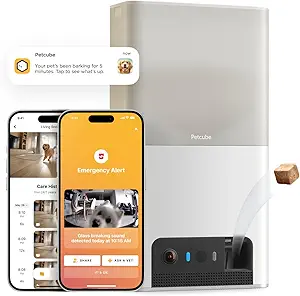 |
Ring Indoor Cam 2nd Gen
Best Overall Wi‑Fi Camera

| Video resolution | 1080p HD |
|---|---|
| Night vision | Color Night Vision |
| Mounting | Tabletop or swivel mount |
| Power | Plug-in |
The Ring Indoor Cam (2nd Gen) is a compact plug-in camera meant for indoor monitoring, offering 1080p HD live view and color night vision so you can check on pets day or night. It mounts on a table or the included swivel mount for higher placement and uses motion detection to trigger real-time alerts to your phone. Advanced Pre-Roll records a few seconds before motion events, which helps capture what led up to activity, and the physical privacy cover lets you quickly block camera and mic when you want privacy. Integration with Alexa enables hands-free viewing on Echo Show devices and announcements when motion is spotted. Practical benefits for pet owners include portable placement, clear daytime video, and software features that reduce false alerts by letting you set motion zones and notification preferences. Limitations include the need for a constant power outlet and that many advanced AI features require a separate Ring Protect subscription to access recorded clips and richer alerts.
Best for: Pet owners who want a reliable, easy-to-use indoor camera that delivers clear live video, simple mounting, and sensible privacy controls for everyday monitoring.
Less Ideal for: People who need battery-powered or completely wireless indoor cameras or those who want local-only recording without relying on cloud subscription services.
- 1080p HD live view with color night vision for clear day and night monitoring
- Advanced Pre-Roll captures seconds before motion events for more context
- Manual privacy cover to quickly disable camera and microphone
- Flexible mounting options for tabletop or high-angle placement
- Alexa integration for voice control and streaming to Echo Show devices
- Requires continuous plug-in power so placement depends on outlet location
- Core recorded clip access and some AI alerts need a Ring Protect subscription
Verdict: The best overall Wi‑Fi camera for most pet owners, offering dependable connection, clear video, and the feature set that covers everyday monitoring needs.
Tapo C100 Indoor Security Camera
Best Budget Wi‑Fi Camera

| Video Capture Resolution | 1080p |
|---|---|
| Field Of View | 110 degrees |
| Night Vision Range | 30 feet |
| Connectivity Technology | Wireless (2.4GHz Wi‑Fi) |
| Power Source | Corded Electric |
The Tapo C100 is a budget-friendly indoor camera that records 1080p video over 2.4GHz Wi‑Fi and sends motion and person alerts to your phone. It is used mounted on a wall or placed on a shelf to monitor pets, babies, or rooms; the 110 degree field of view and 30 ft night vision cover most living spaces. The camera supports two‑way audio with a built-in siren so you can talk to your dog or deter unwanted activity, and recordings save locally to a microSD card (up to 512 GB) or to Tapo Care cloud subscription. Setup is straightforward through the Tapo app and the unit works with voice assistants for viewing on smart displays. Practical limits for buyers include a 2.4GHz‑only Wi‑Fi requirement, a modest 15 fps frame rate, and reliance on a corded power source, which reduce flexibility compared with battery models. For the price, it delivers a solid mix of image clarity, useful alerts, and simple local storage that fits most pet monitoring needs.
Best for: Buyers who want an affordable, dependable indoor pet camera that prioritizes clear 1080p video, night visibility, and basic smart features over advanced analytics or wireless placement.
Less Ideal for: People who need fully wireless battery operation, high frame‑rate video for fast action, or 5GHz Wi‑Fi compatibility should consider other models.
- 1080p HD video with 110° field of view for clear room coverage
- Two‑way audio plus built‑in siren for communicating with or deterring pets
- Night vision up to 30 feet for reliable low‑light monitoring
- Supports local microSD storage up to 512 GB and optional cloud subscription
- Simple setup and compatibility with Alexa and Google Assistant
- Requires 2.4GHz Wi‑Fi and cannot use 5GHz networks
- Corded power limits placement compared with battery cameras
- Frame rate is limited to 15 fps, so fast motion can look less smooth
Verdict: The best budget Wi‑Fi camera for owners who need dependable live view and basic features at a minimal price without extras.
eufy Security Indoor Cam E30
Best Premium Wi‑Fi Camera

| Video Capture Resolution | 4k |
|---|---|
| Connectivity Protocol | Wi-Fi |
| Power Source | Corded Electric |
| Night Vision | Night Color |
| Frame Rate | 25 frames_per_second |
The eufy Indoor Cam E30 is a corded 4K pan-and-tilt camera designed for continuous indoor monitoring of pets, kids, and rooms. It delivers high-resolution 4K capture with a full 360 degree panoramic view and app controls that let you tap to focus or set patrol positions. On-device AI differentiates people, pets, and sounds, and smart auto-tracking follows detected motion so you can keep a pet in frame without manual control. Two-way audio and a built-in spotlight enable voice interactions and color night video, and local storage via SD card plus compatibility with eufy HomeBase gives subscription-free 24/7 recording. Setup is handled through the app and it works with HomeKit, Alexa, and Google Assistant (HomeKit limited to 1080p). The main compromises are that it is corded power only and it supports 2.4 GHz Wi-Fi rather than 5 GHz, which can limit placement flexibility and network performance in crowded Wi-Fi environments. For most pet owners who want clear, continuous monitoring and robust local storage without monthly fees, it balances performance and practicality well.
Best for: Pet owners who want dependable, subscription-free indoor monitoring with high-resolution video and automated tracking for everyday use and long recording windows.
Less Ideal for: People who need a battery-powered camera or prefer devices that use 5 GHz Wi-Fi for higher-bandwidth streaming and more flexible placement.
- True 4K capture with 360 degree pan and panoramic app controls for wide coverage
- On-device AI that distinguishes pets, people, and sounds and offers auto-tracking
- Color night vision with built-in spotlight for clearer nighttime monitoring
- Two-way audio for real-time interaction with pets or family members
- Local storage and HomeBase compatibility for subscription-free 24/7 recording
- Requires a constant power connection so placement needs a nearby outlet
- Only supports 2.4 GHz Wi-Fi which can limit network options
Verdict: The best premium Wi‑Fi camera for owners willing to pay more for top-tier video quality, advanced features, and durable construction.
Blink Mini 2K+ Camera
Best Compact Wi‑Fi Camera

| Video resolution | 2K |
|---|---|
| Zoom | Up to 4x digital |
| Includes | Camera, mounting kit, USB cable, power adapter |
| Voice assistant | Works with Alexa |
The Blink Mini 2K+ is a small plug-in indoor camera designed for discreet home and pet monitoring. It records at 2K resolution with up to 4x digital zoom, so you get sharper, more detailed footage of activity in a room compared with standard 1080p devices, and night vision helps when lighting is low. The unit supports two-way talk with improved noise cancellation, making it practical to call or comfort a dog remotely. Motion detection with optional person and vehicle detection (via subscription) sends alerts when something happens, and the camera can act as a chime for a Blink Video Doorbell when paired. Setup is simple with the included stand, USB cable, and power adapter, and it integrates with Alexa for voice control. Important limitations are that continuous local recording is not built in and advanced detection and cloud storage require a paid Blink subscription, and outdoor use needs a separate weather resistant power adapter. For small spaces where an unobtrusive, easy-to-place camera is the priority, this model balances compact size with solid image and audio performance.
Best for: Buyers who need a small, unobtrusive indoor camera to monitor pets or small rooms and prioritize clear video and simple placement over built-in continuous recording.
Less Ideal for: People who need built-in continuous local recording, full-featured on-device analytics without subscriptions, or an out-of-the-box outdoor camera should consider other models.
- Compact plug-in design fits unobtrusively in small rooms or on shelves
- 2K video with up to 4x zoom delivers clearer, more detailed footage than 1080p cameras
- Two-way talk with noise cancellation makes remote interactions and pet comforting practical
- Easy setup with included stand, USB cable, and power adapter and Alexa integration for voice control
- Can act as a chime for Blink Video Doorbell when paired
- Advanced detection features and cloud storage require a paid Blink subscription
- Not rated or supplied for outdoor use without an optional weather resistant power adapter
Verdict: The best compact Wi‑Fi camera for pet owners who need a discreet, space-saving monitor that still delivers solid video and connectivity.
Wyze Cam Pan v3
Best Wide-Angle Wi‑Fi Camera

| Video Capture Resolution | 1080p |
|---|---|
| Waterproof Rating | IP65 |
| Zoom Ratio | 8x |
| Connectivity Technology | Bluetooth, Wi-Fi |
| Night Vision | Night Color |
The Wyze Cam Pan v3 is a flexible indoor/outdoor home camera that gives full-room coverage by panning 360° and tilting 180°, making it useful for monitoring pets, nurseries, porches, or a living room. Setup is designed to be quick via Bluetooth pairing and the Wyze app, and the camera runs on 2.4 GHz Wi-Fi with continuous power. It records 1080p video at up to 20 fps in daylight and 15 fps at night, and its color night vision plus 8x digital zoom help you spot activity after dark. Motion tracking follows the largest moving object and push alerts notify you of events, while two-way audio lets you comfort a dog or talk to a visitor. The IP65 rating and polycarbonate housing mean it holds up on a covered porch or garage, though it is weather-resistant rather than submersible and needs the Outdoor Power Adapter for recommended outdoor power. Local microSD recording is supported for continuous or event capture, but advanced AI features require an optional subscription. For buyers who want a fast, app-first camera with broad coverage and pet-friendly features, Pan v3 delivers a strong mix of convenience and capability.
Best for: Buyers who want to start monitoring quickly with minimal setup time and an intuitive app, especially those who need full-room coverage for pets or home monitoring.
Less Ideal for: Users seeking completely wireless, battery-powered placement or advanced on-device person/pet identification without a subscription should consider other options.
- 360° horizontal pan and 180° tilt provide near-complete room coverage
- Bluetooth app setup for fast, user-friendly installation
- Color night vision and 8x digital zoom improve low-light visibility
- IP65 weather resistance enables covered outdoor use
- Built-in two-way audio and motion tracking for pet monitoring and interaction
- Requires continuous power and 2.4 GHz Wi‑Fi so placement depends on nearby outlet and network
- Motion tracking follows the largest moving object rather than a specific person or pet
Verdict: The best wide-angle Wi‑Fi camera for households that want maximum room coverage with fewer blind spots for monitoring active pets.
REOLINK E1 Pro 5MP Indoor Camera
Best Night-Vision Wi‑Fi Camera

| Video Capture Resolution | 4 MP |
|---|---|
| Effective Video Resolution | 5 MP |
| Night Vision Range | 40 feet |
| Connectivity Technology | 2.4/5 GHz WiFi |
| Memory Storage Capacity | 256 GB |
The REOLINK E1 Pro is an indoor Wi‑Fi dome camera designed to keep an eye on pets and family at day or night. It delivers 3K/5MP clarity with an F1.6 aperture for improved low‑light performance and color night vision up to about 40 feet, which makes footage more usable when your dog moves around after dark. The motorized 355° pan and 50° tilt cover large rooms and the camera can automatically follow detected people, pets, or baby crying events so you do not miss activity while you are away. Dual‑band Wi‑Fi and quick Bluetooth setup simplify installation, and two‑way audio lets you call pets back or soothe them remotely. Local storage options (microSD up to 512 GB) plus NVR/FTP support give flexibility without mandatory cloud fees. Expect occasional false alerts in busy homes and rely on a stable Wi‑Fi connection for smooth live view and tracking; the camera is indoor only and must stay plugged in.
Best for: Pet owners who want clear, color night footage and automated tracking so they can monitor and interact with pets overnight or in low light.
Less Ideal for: People who need an outdoor or weatherproof camera or who lack reliable home Wi‑Fi and prefer a battery‑powered device.
- High 3K/5MP resolution with F1.6 aperture for brighter low‑light footage
- Color night vision up to 40 feet for usable nighttime detail
- Motorized pan/tilt plus auto‑tracking to follow pets across a room
- Dual‑band Wi‑Fi with Bluetooth setup and two‑way audio for remote interaction
- Multiple local storage options including microSD up to 512 GB and NVR/FTP support
- Indoor‑only design so it is not weatherproof for outdoor use
- Depends on stable Wi‑Fi for smooth live view and effective tracking
Verdict: The best night-vision Wi‑Fi camera for pet owners who need clear, usable footage in low-light or nighttime conditions.
Petcube Bites 2 Lite
Best Two-Way-Audio Wi‑Fi Camera

| Video Capture Resolution | 1080p |
|---|---|
| Field Of View | 110 degrees |
| Night Vision Range | 30 feet |
| Power Source | Corded Electric |
| Connectivity Protocol | Wi-Fi (2.4 GHz) |
The Petcube Bites 2 Lite combines a small footprint with the core features most pet owners need for remote monitoring and reward delivery. It streams 1080p video with a 110-degree wide-angle lens and 30-foot night vision so you can check your pet day or night, and the 8x digital zoom helps when your pet is farther from the camera. Two-way audio lets you hear and talk to your pet in real time while the app-controlled treat dispenser holds about 1.5 pounds of dry treats and can toss them short, medium, or long distances or run scheduled releases. Setup is straightforward on 2.4 GHz Wi-Fi and the unit supports tabletop or wall mounting. Real-time motion and sound alerts are available, with optional cloud features via Petcube Care. Trade-offs include no 5 GHz Wi-Fi support and digital rather than optical zoom, but for a compact, portable dispenser-camera the Bites 2 Lite delivers reliable video monitoring and consistent treat delivery in everyday home use.
Best for: Owners who need a compact, easy-to-place camera that still provides clear live video and dependable treat dispensing for checking in and rewarding pets remotely.
Less Ideal for: People who require 5 GHz Wi-Fi support, optical zoom for fine detail, or a weatherproof unit for outdoor placement should look elsewhere.
- 1080p HD video with 110° wide-angle view for clear monitoring
- Built-in treat dispenser with 1.5 lb container and multiple toss distances
- 30-foot night vision for low-light visibility
- Two-way audio to talk to and hear pets
- Small tabletop or wall-mount design that fits tight spaces
- Only connects to 2.4 GHz Wi-Fi, not 5 GHz
- Zoom is digital only, which can reduce detail at high magnification
Verdict: The best two-way-audio Wi‑Fi camera for owners who want to talk to or comfort their pets remotely and hear sounds clearly from the room.
Choosing the Right Wi Fi Dog Camera: Key Factors to Consider
Video Quality and Night Vision
A sharp, high-resolution video feed helps you see your dog's behavior and body language clearly, which is crucial for spotting signs of distress or destructive activity. Look for cameras with at least 720p resolution for small screens and 1080p if you frequently view on tablets or TVs.
Night vision matters because dogs are active at all hours and indoor lighting fluctuates. Reliable infrared or low-light modes should render facial features and movement without glare. Consider how auto-exposure and wide dynamic range handle backlit scenes so you do not miss details when sunlight or indoor lamps create contrast.
Two-way Audio and Microphone Clarity
Two-way audio allows you to speak to your dog and hear responses or ambient sounds in the room. A clear speaker and sensitive microphone are essential; muffled audio can make it hard to calm a reactive dog or detect distress noises like whining.
Pay attention to latency and how natural voices sound over the connection. Some systems add noise reduction that can suppress household sounds you need to hear. If you rely on voice commands or want to reassure your dog remotely, audio fidelity should be a top priority.
Connectivity and App Reliability
A stable Wi-Fi connection is the backbone of any remote camera system. Cameras that handle spotty home networks gracefully, reconnect automatically, and minimize dropped streams reduce frustration and missed moments.
The mobile app should be intuitive and fast, with reliable live view, event history, and straightforward settings. Frequent software updates and clear documentation indicate ongoing support. Consider whether the camera supports both 2.4 GHz and 5 GHz bands if your home network uses mixed frequencies.
Motion, Sound Alerts and Customization
Timely notifications let you react when your dog is active, vocalizing, or getting into restricted areas. The best systems let you customize sensitivity, set detection zones, and choose alert types so you avoid constant false alarms from hallway traffic or street noise.
Assess how the camera distinguishes between pet movement and other activity, and whether you can schedule alerts by time of day. Flexible alert settings help you focus on the events that matter for managing separation anxiety or destructive behavior.
Power Options and Placement Flexibility
Consider whether the camera needs constant mains power or offers battery operation for temporary placement. Hardwired units give constant uptime but restrict location; battery or rechargeable models let you experiment with placement but require recharge cycles.
Mounting options, swivel range, and compact size affect where you can install the camera to get the best view of your dog's primary areas. Evaluate cord length and whether the device includes mounting hardware for walls or shelves to suit your home layout.
Recording, Storage, and Privacy Controls
Decide between local storage options, like SD cards, and cloud-based recording. Local storage offers control and avoids recurring fees but can be lost if the device is damaged. Cloud services can simplify access to event history but vary in retention duration and cost structure.
Privacy controls such as encrypted streams, two-factor authentication, and the ability to disable remote access are important for household security. Check whether the device supports account management features and clear data deletion options to maintain control over recordings.
How Do I Place a Wi-Fi Dog Camera to See the Most Activity?
Position the camera to cover the dog's primary living and resting spaces, such as where they sleep, the main doorway, or a favorite spot near windows. Elevate the camera to a slightly downward angle so you capture body movement and facial cues while minimizing obstructions from furniture.
Avoid placing the camera directly facing intense light sources like windows, which can create silhouette effects. If you need to monitor multiple areas, consider a wide-angle camera or mounting the device where it can pan or tilt to follow activity.
- Aim for a height of 4 to 6 feet to balance a clear field of view and reduce easy tampering.
- Use mounts or shelves to secure unstable surfaces and prevent accidental knocks.
- If monitoring an entry point, angle the camera to capture incoming traffic without pointing at the outdoors.
Will Two-way Audio Actually Calm an Anxious Dog?
Two-way audio can be effective for reassurance, especially when a dog already responds to your voice. Hearing you speak in a calm tone may reduce barking and help the dog settle, but results vary by temperament and the strength of separation-related anxiety.
For some dogs, an unfamiliar voice or delayed audio can increase excitement or confusion. Test short, calm check-ins and combine voice with routines such as treats or familiar cues to build a calming association.
- Keep messages brief and consistent to avoid overstimulation.
- Pair audio check-ins with positive reinforcement when you return home to reinforce calm behavior.
How to Manage False Alerts and Notification Fatigue
Start by reducing motion sensitivity and enabling detection zones so the camera only notifies you about the areas your dog uses. This prevents alerts from neighbors moving outside windows or household traffic in unrelated rooms.
Schedule quiet hours for notifications during predictable sleep times and use sound-only alerts selectively if movement is less relevant. Many apps allow you to customize push notifications or email summaries to suit your daily routine.
- Use activity history to identify common false-trigger sources and adjust settings accordingly.
- Combine motion and sound triggers to reduce alerts caused by brief, irrelevant movements.
Can a Wi-Fi Dog Camera Help with Training?
A camera provides objective footage you can use to analyze problem behaviors and track progress over time. Reviewing recordings helps identify triggers for barking, destructive chewing, or pacing, which informs training strategies you can apply when present.
Use the camera for remote reinforcement only as a short-term aid; in-person training with consistent cues remains essential for long-term behavior change. Video evidence can also help you share specific incidents with a trainer for targeted advice.
- Record routine behavior to establish baselines before implementing training changes.
- Use time-stamped clips to correlate events with household schedules or environmental factors.
What Should I Know About Network Security for Pet Cameras?
Treat your camera like any internet-connected device: use strong, unique passwords and enable any available two-factor authentication. Keep the camera firmware and companion app up to date to patch security vulnerabilities that could expose video streams.
If your router supports guest networks, place the camera on a separate network segment to limit access from other devices. Review permissions in the app to control who can view live feeds or recordings and disable features you do not use to reduce attack surface.
- Avoid default login credentials and change them during setup.
- Limit cloud sharing links and audit connected accounts periodically.
How We Chose the Best Wi Fi Dog Camera
Our editorial process focused on features that matter most to dog owners and real-world reliability. We prioritized clear daytime and low-light video, dependable Wi-Fi connectivity, and intuitive mobile controls so owners can check in and respond quickly. Two-way audio and microphone quality were weighted heavily because voice feedback can calm or redirect dogs remotely. We also considered motion and sound alerts with customizable sensitivity to avoid false alarms triggered by non-pet movement. Durability and power options were included, with preference for units that offer stable power solutions and easy placement. Privacy and security features such as encrypted streams and password-protected accounts were assessed to protect household data. Ease of setup and app stability were important to ensure owners of varying technical ability can use the device reliably. We excluded devices that lacked essential camera features for pet monitoring, such as poor low-light performance, no two-way audio, or unreliable cloud/local recording options. Final selections balanced core specs, practical usability, and features specific to pet care rather than general-purpose novelty functions.
Our full evaluation process is outlined in our review methodology.
FAQ
Do I need a special Wi-Fi network for a dog camera?
Not usually. Most cameras work on standard home Wi-Fi, though 2.4 GHz networks offer broader range while 5 GHz gives faster throughput. Ensure your router provides stable coverage where you place the camera and consider a mesh system if signal strength is weak.
How long do recorded video clips usually last?
Clip length depends on the device settings and storage option. Many cameras save short event clips of 10 to 60 seconds by default, while continuous recording requires higher storage capacity or a subscription. Check recording modes to match how much footage you want to keep.
Will the camera drain my dog's battery-powered toys or other electronics?
A Wi-Fi camera itself does not interfere with other devices' batteries. However, placing the camera near electronics can complicate power access and cable management. For battery-operated cameras, expect periodic recharging depending on usage and motion activity levels.
Can I use the camera to check on multiple dogs in different rooms?
Yes, but one stationary camera only covers a single field of view. To monitor multiple rooms effectively, use multiple cameras or choose a unit with pan-and-tilt functionality. Placing cameras strategically at feeding and sleeping areas improves coverage for multi-dog households.
Is cloud storage necessary for pet monitoring?
Cloud storage is convenient for remote access and longer retention without local hardware, but it may involve recurring fees. Local storage on removable media gives you direct control but can be vulnerable if the device is stolen or damaged. Choose based on how long you need archives and your privacy preferences.
Final Verdict
When choosing a Wi-Fi dog camera, prioritize the features that directly affect how you monitor and interact with your pet: clear video, reliable two-way audio, stable connectivity, and alert customization. Balance placement and power needs with the level of monitoring you want, and decide whether cloud storage or local recording suits your privacy preferences. Tradeoffs are inevitable: higher-resolution feeds and continuous recording increase bandwidth and storage needs, while battery operation adds flexibility at the cost of uptime. Focus on the few features that will improve your daily routine and comfort with remote monitoring to pick the most practical camera for your home.