

If you spend time away from home, a reliable dog camera can help you check on your pet, monitor behavior, and talk to them when needed. The right camera gives you peace of mind, usable video during day and night, and controls that are simple to operate from a phone or tablet. This guide shortlists the top choices for dog cameras and explains the practical features that matter, such as video quality, audio interaction, motion alerts, and mounting options. Read on to see which options meet common owner needs and which tradeoffs to expect.
Top Picks at a Glance
| Best Overall Camera The best all-around dog camera for most pet owners' needs | Ring Indoor Cam 2K |  |
| Best Budget Camera A low-cost camera that still provides basic pet monitoring features | Cinnado D1 2K Indoor Camera |  |
| Best Premium Camera A higher-end camera with advanced features and superior build quality | REOLINK E1 Zoom Indoor Camera |  |
| Best 4K Camera A high-resolution camera offering the sharpest video detail and clarity | Anona Pano 4K Indoor Camera |  |
| Best Compact Camera A small-footprint camera ideal for tight spaces and discreet placement | Blink Mini 2K+ Camera |  |
| Best Indoor-Outdoor Camera A weather-resistant camera suitable for both inside and outside use | Wyze Cam OG |  |
| Best Pan-and-Tilt Camera A camera with wide coverage thanks to remote pan and tilt controls | Tapo Pan Tilt Camera C210 |  |
Ring Indoor Cam 2K
Best Overall Camera
| Video resolution | Retinal 2K |
|---|---|
| Zoom | Up to 6x Enhanced Zoom |
| Night mode | Low-Light Sight (color with ambient light, B/W in darkness) |
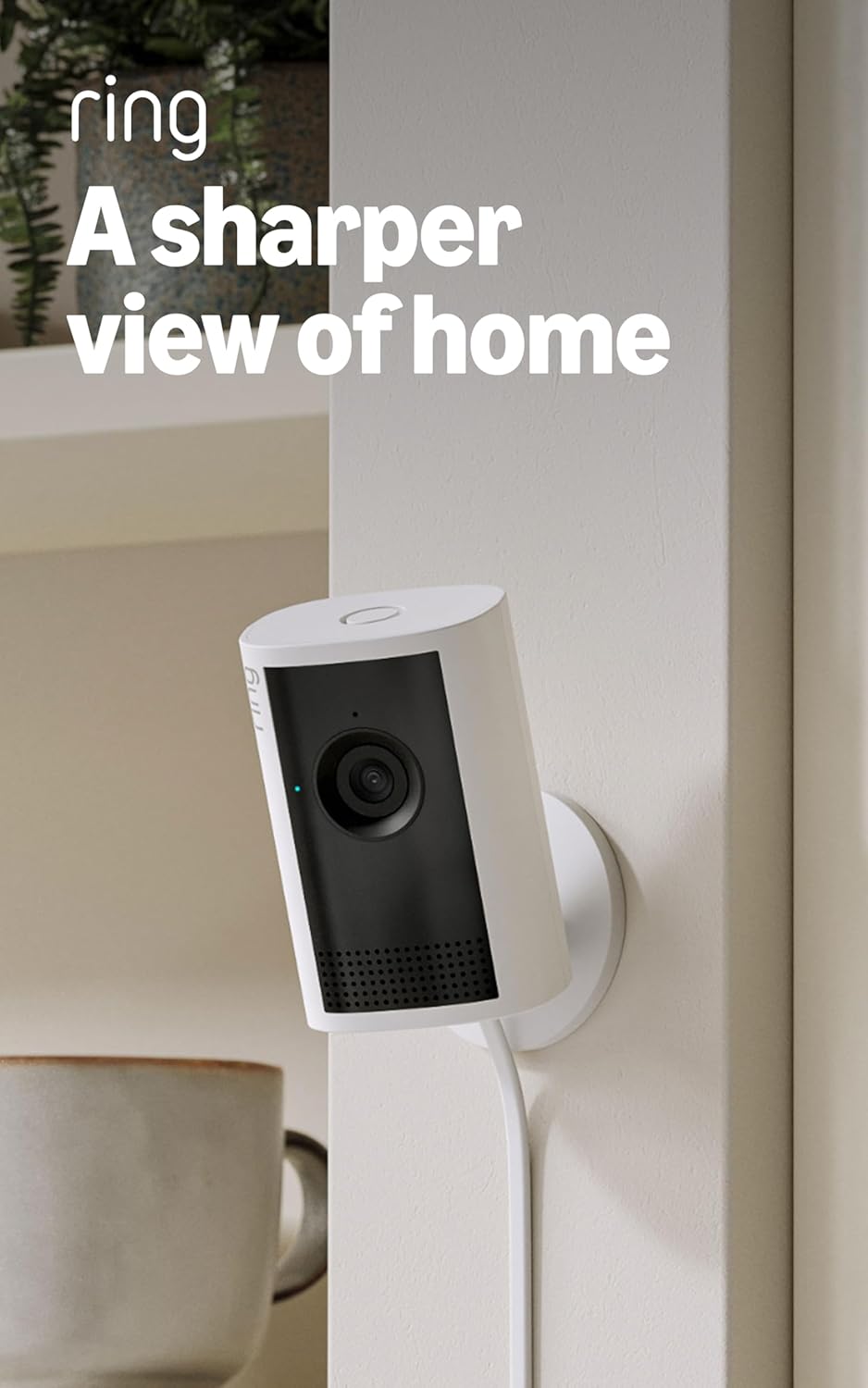
The Ring Indoor Cam 2K is a compact indoor security camera designed for continuous home monitoring and pet watching. It captures high-resolution Retinal 2K video with up to 6x enhanced zoom so you can check fine details across a room, and Low-Light Sight preserves true color with some ambient light while switching to crisp black-and-white in full darkness. The camera delivers real-time motion alerts, live view, and two-way talk so you can remotely check on and interact with a dog during the day or soothe them when they get anxious. The sliding lens cover is a practical privacy control, and settings in the app let you mute or adjust the microphone and motion sensitivity. Expect video quality to depend on your internet bandwidth and device temperature, and remember continuous cloud recording requires a compatible subscription for extended history. Installation is straightforward for indoor spots but this model is not weatherproof for outdoor use.
Best for: Buyers who want a reliable, easy-to-use indoor camera that delivers clear high-resolution video and simple two-way interaction for everyday pet monitoring.
Less Ideal for: Users who need weatherproof outdoor cameras or those who want local-only continuous recording without a cloud plan.
- High-resolution Retinal 2K video with up to 6x enhanced zoom for clear monitoring.
- Low-Light Sight that preserves color in dim conditions and switches to detailed black-and-white in darkness.
- Real-time motion alerts plus Live View and two-way talk for immediate interaction with pets.
- Slide-to-cover lens for quick physical privacy control.
- Compact indoor-focused design that is easy to install and position.
- Requires a cloud subscription for extended video history and advanced features.
- Not rated or sealed for outdoor or wet environments.
Verdict: The best all-around camera that balances video quality, reliability, ease of use, and pet-focused features for everyday monitoring.
Cinnado D1 2K Indoor Camera
Best Budget Camera

| Video Capture Resolution | 2K |
|---|---|
| Connectivity Technology | Wi-Fi (2.4 GHz) |
| Memory Storage Capacity | 128 GB |
| Power Source | Corded Electric |
| Night Vision | Night Color |
The Cinnado D1 is a budget-friendly indoor dome camera that delivers clear 2K livestreaming and wide coverage using pan and tilt controls for near 360 degree monitoring. It connects over 2.4 GHz Wi-Fi and is controlled through a phone app on iOS or Android, where you can view live video, receive motion alerts, and speak through the built-in microphone and speaker. The camera supports continuous recording to a microSD card (up to 128 GB) or optional encrypted cloud storage, and will automatically save short clips when motion is detected. Night color vision and IR illumination help keep subjects visible after dark, and the camera includes a siren for audible alerts. Setup requires the camera to remain plugged into power and to be close to the router during pairing, and it does not support 5 GHz Wi-Fi which may limit placement in some homes. For the price it provides a solid set of essentials—clear image, app control, two-way talk, and local storage—making it a sensible choice when you want reliable monitoring without extras like battery operation or advanced analytics.
Best for: Pet owners who want dependable live video, two-way talk, and local recording on a tight budget and are comfortable with a wired indoor camera that uses a phone app.
Less Ideal for: People who need a battery-powered or fully wireless camera, households that rely on 5 GHz Wi-Fi coverage, or users who want advanced cloud analytics built in.
- 2K resolution with pan/tilt for near 360 degree coverage
- Two-way audio allows live conversations with pets or family
- Supports local microSD recording up to 128 GB plus optional encrypted cloud
- Night color vision and IR illumination for usable low-light footage
- Requires constant power and only supports 2.4 GHz Wi-Fi, not 5 GHz
Verdict: The best budget camera for owners who want dependable live video and essential features without spending much.
REOLINK E1 Zoom Indoor Camera
Best Premium Camera

| Effective Video Resolution | 8 MP |
|---|---|
| Optical Zoom | 3 x |
| Pan & Tilt | 355° pan, 50° tilt |
| Wi‑Fi | Dual-band Wi‑Fi 6 (2.4/5 GHz) |
| Local Storage | microSD up to 512 GB |
The REOLINK E1 Zoom is an indoor pan-tilt security camera aimed at delivering high-detail monitoring and flexible coverage in a home setting. It combines 4K-enhanced stills with a 3x optical zoom and auto-focus so you can zoom in on faces or distant details without losing clarity, and the 355° pan with 50° tilt plus preset positions makes it practical for watching a large room or following a pet around. Setup is simplified by Bluetooth-assisted pairing and dual-band Wi‑Fi 6 support improves stability on congested home networks. Smart detection modes include person, pet, and crying-sound alerts along with auto-tracking, and two-way talk lets you interact in real time; local recording is supported via microSD or Reolink NVR/Home Hub for no-monthly-fee storage. Important limits are that the camera is indoor-only and requires a 5V DC power connection, and advanced detection modes are limited to two active at once. For homeowners who prioritize image quality and active monitoring of dogs or a nursery, it provides a capable, feature-rich option.
Best for: Buyers who want top-tier image quality and sophisticated monitoring features for indoor pet or nursery surveillance and are willing to invest in a durable, feature-rich camera.
Less Ideal for: People who need a weatherproof outdoor camera or a battery-powered, wireless solution for locations without nearby power.
- 4K-enhanced imaging with 3x optical zoom and auto-focus for clearer detail at distance
- Pan and tilt with up to 64 preset positions and auto-tracking to cover wide indoor areas
- Dual-band Wi‑Fi 6 and Bluetooth-assisted setup for more reliable connections and easier installation
- Multiple local storage options including microSD up to 512GB and Reolink NVR/Home Hub support
- Smart alerts for person, pet, and crying sounds plus two-way talk for instant interaction
- Not rated or sealed for outdoor use so must remain indoors
- Requires constant 5V DC power; no battery operation
Verdict: The best premium camera for owners willing to pay more for top video quality, robust features, and long-term reliability.
Anona Pano 4K Indoor Camera
Best 4K Camera

| Video Capture Resolution | 4k |
|---|---|
| Effective Video Resolution | 8MP |
| Frame Rate | 15 frames per second |
| Night Vision Range | 30 feet |
| Flash Memory Supported Size Maximum | 512 GB |
The Anona Pano is an indoor security camera built to capture very detailed 4K footage and keep an eye on pets or family across a full room. It combines a professional-grade lens with 8x zoom and a 355° pan plus 110° tilt so you can scan ceilings to floors without moving the base, and the app-controlled auto-tracking follows motion automatically. AI alerts identify people, pets, and baby crying and push notifications to your phone, while two-way audio lets you speak to your dog remotely. It supports local microSD storage up to 512 GB or optional cloud storage, and uses dual-band Wi‑Fi 6 for smoother streams. Night vision and four IR LEDs extend monitoring after dark, though the 15 fps frame rate is modest for very fast action and high-res 4K files demand ample bandwidth and storage. Setup is typical for app-first cameras and it runs on a corded 5V power adapter, so it suits indoor, plugged installations rather than battery setups.
Best for: Buyers who want the clearest possible indoor footage to spot small movements, facial detail, or subtle behavior in pets and prioritize high resolution over battery freedom.
Less Ideal for: People who need a battery-powered or outdoor cordless camera or who require very high frame rates for sports or fast-motion capture should look elsewhere.
- True 4K (8MP) capture with 8x zoom for identifying small details and faces
- Wide 355° pan and 110° tilt with auto-tracking for near-complete room coverage
- AI person, pet, and baby-cry detection with phone notifications
- Dual-band Wi‑Fi 6 connectivity for more stable streaming and lower latency
- Supports local microSD storage up to 512 GB plus optional encrypted cloud storage
- Frame rate limited to 15 fps which can blur very fast movement
- Requires constant power via included adapter so not suitable for cordless placement
Verdict: The best 4K camera for owners who prioritize ultra-clear footage to spot small movements, faces, and fine details.
Blink Mini 2K+ Camera
Best Compact Camera

| Video resolution | 2K |
|---|---|
| Zoom | Up to 4x digital |
| Includes | Camera, mounting kit, USB cable, power adapter |
| Voice assistant | Works with Alexa |
The Blink Mini 2K+ is a small plug-in indoor camera designed for discreet home and pet monitoring. It records at 2K resolution with up to 4x digital zoom, so you get sharper, more detailed footage of activity in a room compared with standard 1080p devices, and night vision helps when lighting is low. The unit supports two-way talk with improved noise cancellation, making it practical to call or comfort a dog remotely. Motion detection with optional person and vehicle detection (via subscription) sends alerts when something happens, and the camera can act as a chime for a Blink Video Doorbell when paired. Setup is simple with the included stand, USB cable, and power adapter, and it integrates with Alexa for voice control. Important limitations are that continuous local recording is not built in and advanced detection and cloud storage require a paid Blink subscription, and outdoor use needs a separate weather resistant power adapter. For small spaces where an unobtrusive, easy-to-place camera is the priority, this model balances compact size with solid image and audio performance.
Best for: Buyers who need a small, unobtrusive indoor camera to monitor pets or small rooms and prioritize clear video and simple placement over built-in continuous recording.
Less Ideal for: People who need built-in continuous local recording, full-featured on-device analytics without subscriptions, or an out-of-the-box outdoor camera should consider other models.
- Compact plug-in design fits unobtrusively in small rooms or on shelves
- 2K video with up to 4x zoom delivers clearer, more detailed footage than 1080p cameras
- Two-way talk with noise cancellation makes remote interactions and pet comforting practical
- Easy setup with included stand, USB cable, and power adapter and Alexa integration for voice control
- Can act as a chime for Blink Video Doorbell when paired
- Advanced detection features and cloud storage require a paid Blink subscription
- Not rated or supplied for outdoor use without an optional weather resistant power adapter
Verdict: The best compact camera for homes where size and unobtrusive placement matter while still delivering solid monitoring performance.
Wyze Cam OG
Best Indoor-Outdoor Camera

| Video Capture Resolution | 1080p |
|---|---|
| Night Vision Range | 30 feet |
| Waterproof Rating | IP65 |
| Memory Storage Capacity | 128 GB |
| Power Source | Corded Electric |
The Wyze Cam OG is a compact indoor/outdoor security camera designed to monitor pets, entryways, and yards with 1080p live streaming and color night vision. It plugs into power, connects to 2.4 GHz Wi-Fi, and sends motion and sound alerts to the Wyze app where you can view live video, enable picture-in-picture for two cameras, and adjust detection zones. Notable features include an integrated 40-lumen spotlight, a 90 dB siren, upgraded two-way audio with noise and echo cancellation, and support for continuous local recording to a microSD card up to 256 GB. The camera is IP65-rated for weather resistance, so it can be used outdoors when paired with Wyze's outdoor power adapter, and it can also detect smoke and CO alarm sounds for extra safety. Trade-offs are that it only supports 2.4 GHz Wi-Fi and requires a separate outdoor power adapter for outdoor mounting, and advanced cloud features need a paid subscription. For pet owners who want an affordable, durable camera that captures color night footage and lets you talk to and check on pets remotely, the Wyze Cam OG covers the essentials well.
Best for: Pet owners who want one versatile camera that can be used inside or outside to keep an eye on animals, deter intruders, and interact remotely through clear two-way audio.
Less Ideal for: Users who rely on 5 GHz Wi-Fi or who need fully wireless battery-powered outdoor placement without buying extra accessories should consider other options.
- 1080p HD live video with color night vision for clearer low-light pet monitoring
- IP65 weather resistance suitable for indoor or outdoor placement with proper power
- Built-in 40-lumen spotlight and 90 dB siren for visibility and deterrence
- Improved two-way audio with noise and echo cancellation for clearer communication
- Supports 24/7 local recording to microSD (up to 256 GB) with no subscription required
- Requires 2.4 GHz Wi-Fi only and is not compatible with 5 GHz networks
- Outdoor deployment needs a separately sold Wyze outdoor power adapter
- Cloud AI alerts and continuous cloud backup require a paid subscription
Verdict: The best indoor-outdoor camera for owners who need a single unit that handles weather exposure and indoor pet surveillance.
Tapo Pan Tilt Camera C210
Best Pan-and-Tilt Camera

| Video Capture Resolution | 1296p |
|---|---|
| Effective Video Resolution | 1440 pixels |
| Viewing Angle | 114 degrees |
| Night Vision Range | 30 feet |
| Memory Storage Capacity | 256 GB |
The Tapo C210 is a motorized indoor camera built to track activity and give wide coverage of a room using 360° horizontal and 114° vertical pan/tilt movement. It captures 2K (1296p/1440p effective) video for clearer detail than standard 1080p units, includes night vision to about 30 feet, and offers two-way audio so you can talk to or soothe a pet remotely. The camera supports motion, person and baby-cry detection with push alerts, and has an audible siren for scaring off intruders or interrupting unwanted behavior. Storage is flexible: local microSD recording up to 512 GB or optional Tapo Care cloud plans. Setup and control are handled through the Tapo app with voice viewing on Alexa or Google devices. Expect reliable Wi-Fi performance for typical home networks but remember it is a corded indoor unit and needs constant power and a compatible 2.4 GHz network; advanced users can use RTSP/ONVIF for NVR integration. For pet owners who want to follow an active dog around the room, the motorized pan/tilt, motion tracking, and clear two-way audio make the C210 a practical choice, though it requires a steady power source and app reliance for remote features.
Best for: Someone who needs an actively controllable indoor camera to keep tabs on an energetic dog and prefers motorized tracking and real-time interaction over static views.
Less Ideal for: People who need a battery-powered or truly wireless camera for remote placement, or those who want a camera that operates without a vendor app dependency.
- Motorized pan/tilt with 360° horizontal and 114° vertical coverage for following pets around a room
- 2K resolution for clearer detail than 1080p cameras
- Motion, person and baby-cry detection with instant push alerts
- Two-way audio with built-in siren to communicate with or deter pets and intruders
- Local microSD recording up to 512 GB plus optional cloud subscription for longer retention
- Requires constant power and a 2.4 GHz Wi-Fi connection so placement is limited by cable length and network
- Relies on the Tapo app for most advanced features and notifications
Verdict: The best pan-and-tilt camera for owners who want expansive, controllable views to follow active pets around a room.
Choosing the Right Dog Camera: Key Factors to Consider
Video Quality and Night Vision
Clear daytime video helps you see your dog's posture and facial expressions, which matters for spotting distress, separation anxiety, or unusual behavior. Resolution affects how much detail you can make out at a distance, and higher resolution can make identification easier when reviewing clips.
Night vision or low-light performance is equally important because many incidents happen in dim conditions. Look for cameras with balanced infrared illumination or low-light sensors that maintain contrast without washing out the scene. Good night footage reduces the need for extra lighting that could disturb your pet.
Two-way Audio and Microphone Sensitivity
Two-way audio lets you soothe, correct, or call your dog remotely. Microphone quality determines how well you hear barking or soft whines, and speaker clarity affects whether your voice comes through naturally or sounds distorted. Latency matters too; long delays can make interactions confusing for both you and your dog.
If you plan to use voice commands through the camera, prioritize models with noise suppression and echo cancellation to keep messages intelligible in busy environments.
Motion and Sound Alerts
Alert systems tell you when your dog is active without needing constant live view. Accuracy matters because frequent false alerts quickly become distracting. Cameras with adjustable sensitivity, motion zones, or sound-trigger thresholds let you tune notifications to your home and pet's routine.
Advanced detection that differentiates between human and pet movement can reduce unnecessary pushes. Consider how alerts are delivered and whether the app provides quick clip previews so you can assess an event rapidly.
Field of View and Mounting Options
A wider field of view covers more of a room but can distort edges, while narrower lenses give more detail in a focused area. Think about where your dog spends most of its time and choose a camera with an angle that captures that space without blind spots.
Mounting versatility matters for placement—tabletop, wall, or ceiling mounts change the perspective and stability. A secure mount keeps the camera out of a curious dog's reach and reduces the chance of accidental knocks that disrupt monitoring.
Local Storage and Privacy Controls
How video is stored affects both privacy and access. Local storage or on-device recording gives you footage that does not leave your home network, which appeals to owners concerned about cloud privacy. Cloud options add convenience and offsite backups but introduce account and subscription choices.
Privacy controls such as scheduled recording, manual disable, and encryption during transmission let you limit data exposure. Confirm which controls are available and how easy they are to access in the camera's app.
App Usability and Connectivity
A camera is only useful if the app is stable and intuitive. Look for straightforward setup flows, reliable live streaming, and minimal lag when switching between cameras. Features like group access for family members and selectable notification profiles are helpful for shared households.
Connectivity robustness matters for homes with variable Wi-Fi. Cameras that handle brief network interruptions gracefully, resume recording automatically, and offer good streaming performance on both Wi-Fi and mobile data will save frustration.
How Do I Position a Dog Camera for the Best Coverage?
Place the camera where it captures the area your dog uses most, such as a sleeping spot, a favorite couch, or the entryway. Aim for a slightly elevated position to reduce the chance of the camera being bumped and to give a clearer perspective of body language.
If your dog moves between rooms, consider combining one wide-angle camera at a central location with a secondary unit focused on a specific high-traffic zone. Adjust the angle and height, then review live footage at different times of day to spot glare or shadows that obscure the view.
- Mount higher than the dog's reach to avoid knocks
- Avoid backlit windows that silhouette the subject
- Use adjustable mounts to fine-tune framing
Can a Camera Help Reduce Separation Anxiety?
A camera can partially address separation anxiety by letting you check in, speak to your dog, and provide intermittent reassurance. Hearing your voice can calm some dogs, but it is not a substitute for behavior modification or professional training for severe cases.
Use two-way audio sparingly and pair remote interactions with positive reinforcement. Observing patterns of pacing, whining, or destructive behavior in recorded clips can also give you useful information to discuss with a trainer or veterinarian.
- Schedule short, calm check-ins rather than frequent surprise calls
- Record episodes to identify triggers or times when anxiety worsens
What Should I Expect From the App Experience?
Expect basic controls like live view, event history, and notification settings. Good apps let you mark important clips, download footage, or share temporary access with others. Look for a responsive interface that loads quickly on both phones and tablets.
Check whether the app supports multiple user profiles, in-app firmware updates, and clear privacy settings. An app with straightforward alert management will save you time and reduce unnecessary interruptions.
- Prefer apps with clip previews in the notification
- Ensure the app offers clear on/off recording controls
How Do Storage Options Affect Long-term Use?
Local storage avoids recurring fees and keeps footage within your network, but it can be limited by card capacity and is vulnerable if the device is damaged or stolen. Cloud storage simplifies offsite backup and multi-device access, but often requires a subscription for longer retention.
Consider how long you need to keep clips. If you want week-long or month-long histories for behavioral analysis, look for devices or plans that match that retention without excessive manual management.
- Use scheduled deletion or overwrite settings to manage local storage
- Export important clips regularly if relying on local-only storage
Are There Safety Considerations to Keep in Mind?
Ensure power cords are kept out of reach or secured so curious dogs cannot chew them. If you place a camera near water bowls or areas where spills can occur, pick a model with splash resistance or position it at a safer distance.
Check that the camera is mounted securely and that mounting hardware is appropriate for the surface. Regularly update firmware and app software to keep security patches current and reduce the risk of unauthorized access.
- Hide or secure power cables
- Keep cameras away from direct access to prevent damage
How We Chose the Best Dog Camera
We evaluated candidates based on features that matter for everyday dog monitoring and owner convenience. Core criteria included live video quality and low-light performance, because clear daytime and nighttime footage are essential for recognizing gestures and checking on pets. Two-way audio and microphone sensitivity were weighed next to ensure you can hear and speak to your dog without excessive delay or distortion. Motion and sound alert accuracy were measured for usefulness rather than gimmicks; reliable notifications reduce false alarms and highlight meaningful activity. We also considered mounting and field-of-view options so cameras can cover the typical areas dogs use, and assessed physical design for durability and cord management. App usability and setup complexity were tested to favor devices that owners can configure and control quickly. Privacy features and local storage options were included to accommodate different preferences. We excluded products with persistently reported connectivity failures, nonstandard power requirements, or very limited customer support options. The final list favors reliable everyday performance over unproven experimental features.
Our full evaluation process is outlined in our review methodology.
FAQ
Will I need a strong Wi-Fi network to use a dog camera?
Usually yes. Live streaming and cloud uploads rely on stable Wi-Fi. A camera placed far from the router or behind multiple walls may experience lag or disconnects, so consider improving coverage or using a wired connection if available.
How much footage do dog cameras typically store?
Storage varies by device and plan. Local storage on a memory card may hold a few days to a couple of weeks depending on resolution and motion activity. Cloud plans often set retention windows; check retention lengths before relying on a particular setup.
Can a camera tell the difference between a dog and a person?
Some devices offer pet-specific detection, but accuracy varies. Pet-focused detection can reduce nonessential alerts, yet it is not perfect and may still require sensitivity adjustments to match your home environment.
Is two-way audio safe for training or giving commands?
Two-way audio can be useful for calming or issuing simple cues, but it is not a replacement for live training sessions. Latency and sound quality can limit effectiveness, so use remote audio as a supplement rather than the primary training method.
How do I balance privacy with remote monitoring?
Use features like scheduled recording windows, manual disable options, and encrypted connections. Limit cloud access with strong account passwords and enable two-factor authentication where available to protect your recorded footage.
Final Verdict
When choosing a dog camera, prioritize the features that match how you plan to use it. If you need clear day and night monitoring, focus on video quality and low-light performance. If remote interaction is important, give weight to two-way audio and app responsiveness. For owners concerned about data, compare local storage and privacy controls before deciding. Tradeoffs are inevitable: wider fields of view capture more space but may sacrifice detail, and cloud storage adds convenience at the cost of ongoing accounts. Pick the options that solve the biggest pain points for your household and confirm the device integrates smoothly with your home network for dependable everyday use.