
If you want to check in on your dog while you are away and reward good behavior remotely, a camera that dispenses treats can make daily care easier. These devices combine live video, two-way audio, and timed or on-demand treat delivery so you can reassure anxious pets, reinforce training, or simply stay connected during the day. Choosing the right unit matters because video clarity, treat-dispensing consistency, latency, and app usability directly affect how effective and reliable the setup will be for your household. This guide covers seven shortlisted dog cameras that dispense treats and explains the practical strengths buyers should expect. We evaluated each option across core usability and reliability areas so you can pick a camera that fits your routine and your dog's temperament.
Top Picks at a Glance
| Best Overall Camera The best all-around dog camera for most pet owners | Furbo 360° Dog Camera |  |
| Best Budget Camera A wallet-friendly camera that covers core features reliably | TKENPRO 2K Pet Camera Treat Dispenser |  |
| Best Premium Camera A higher-end camera with advanced features and performance | Enabot EBO ROLA PetPal |  |
| Best Compact Camera A small-footprint camera that fits tight spaces and shelves | Petcube Bites 2 Lite | 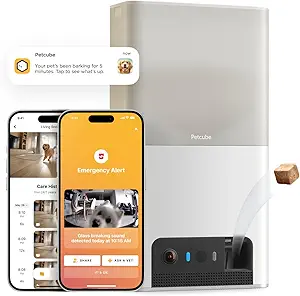 |
| Best Battery-Powered Camera Wireless camera option for flexible placement without cords | pumpkii BQ70 Pet Camera Robot |  |
| Best High-Capacity Treat Camera A camera with a larger treat hopper for frequent dispensing | SKYMEE AI-B20 Plus 12L Pet Feeder |  |
| Best Smart-Home Compatible Camera A camera that integrates smoothly with home smart assistants | Skymee Petalk AI Treat Camera |  |
Furbo 360° Dog Camera
Best Overall Camera

| Video Capture Resolution | 1080p, 720p |
|---|---|
| Viewing Angle | 360 degrees |
| Night Vision Range | 7 meters |
| Connectivity Protocol | Wi-Fi |
| Power Source | Corded Electric |
The Furbo 360° Dog Camera is a freestanding indoor pet camera designed to let you see, talk to, and dispense treats to your dog from the Furbo app. It features a motorized 360 degree rotating lens with Full HD 1080p live video, 4x zoom, and color night vision so you can monitor an entire room day or night. Two-way audio lets you speak to your pet in real time while the treat dispenser holds about 100 small dry treats and lets you adjust toss size for rewards or redirection. Basic barking alerts and motion notifications arrive on your phone without a subscription, and new users get a 14-day trial of Furbo Nanny for optional AI alerts and video history. Setup is straightforward on a 2.4 GHz Wi-Fi network, but the camera requires a continuous power connection and a separate USB power adapter is not included. The unit is focused on indoor use and advanced AI features require a paid plan after the trial. For most owners the combination of wide coverage, clear video, and reliable treat delivery makes it a practical all-in-one monitor and motivator for pets.
Best for: Pet owners who want a single, easy-to-use camera that combines wide-room coverage, clear live video, and a reliable treat dispenser for check-ins, training, and separation support.
Less Ideal for: People who need a battery-powered or outdoor-rated treat camera or those who want unlimited AI alerts and cloud history without a subscription.
- 360° motorized coverage with 1080p video reduces blind spots in a single room.
- Color night vision lets you monitor pets in low light with clearer detail than simple IR-only cameras.
- Two-way audio with in-app volume control enables real-time interaction and calming voice commands.
- Treat dispenser holds about 100 small treats and offers adjustable toss sizes for training or distraction.
- Basic barking and motion alerts work without a subscription and new users get a 14-day trial of advanced AI features.
- Requires continuous wired power and does not include a USB wall adapter in the box.
- Advanced AI alerts and video history require a subscription after the 14-day trial.
Verdict: The best overall camera for pet owners who want a balanced mix of video quality, treat dispensing, reliability, and easy daily use.
TKENPRO 2K Pet Camera Treat Dispenser
Best Budget Camera

| Video Capture Resolution | 2k |
|---|---|
| Viewing Angle | 360 degrees |
| Power Source | Corded Electric |
| Connectivity Protocol | Wi-Fi |
This TKENPRO unit combines a 2K indoor camera with a built-in treat dispenser so you can check on pets and toss a snack from the app. Set on a countertop or mounted with the included base, the camera pans nearly 360 degrees and uses auto-tracking and motion or bark alerts to follow activity, while night color vision keeps footage usable in low light. Use the CloudEdge phone app to speak through two-way audio, schedule automatic treat tosses, or trigger a manual dispense; the hopper holds standard small treats (recommended 7–15 mm). There are two storage choices: limited short cloud retention without subscription and optional local recording via microSD up to 128 GB. Practical benefits include clear 2K video for identifying pets, app notifications that reduce false alerts with customizable detection, and remote interaction to soothe separation anxiety. Expect trade-offs typical for a budget-focused camera: it is corded only, some advanced AI features require a subscription, and voice or push notifications can be sensitive until you tweak settings.
Best for: Pet owners who want reliable live video and a functional treat dispenser on a budget and are willing to use a corded, app-driven device for remote interaction.
Less Ideal for: People who need a battery-powered or fully wireless camera, or those who expect unlimited cloud features without any subscription.
- 2K resolution with auto focus for clear pet footage
- Near 360° pan and AI auto-tracking to keep pets in frame
- Integrated treat dispenser with remote toss and scheduling
- Two-way audio for real-time interaction
- Supports local microSD recording up to 128 GB plus cloud options
- Requires mains power so it is not battery portable
- Some AI album features and extended cloud storage require a paid subscription
Verdict: The best budget camera for owners who need reliable video and basic treat-dispensing at a lower price without extra premium features.
Enabot EBO ROLA PetPal
Best Premium Camera

| Video Capture Resolution | 2.5K |
|---|---|
| Power Source | Battery Powered |
| Connectivity Protocol | Wi-Fi |
| Built-In Media | 32GB microSD (pre-installed) |
The ROLA PetPal is a mobile pet camera robot designed to roam your home while letting you see, talk to, and reward your pet remotely. You drive it from your phone or send it to patrol, view 2.5K video day or night, and use two-way audio to comfort or call your pet. The included treat dispenser lets you reward pets on demand and the preinstalled 32GB card stores footage locally, avoiding mandatory subscriptions for basic recording. ROLA handles docking automatically via an infrared-backed charging base so it stays ready between uses, though the brand notes docking works best when the dock and robot are in the same open area. The unit is modular: the basic kit includes the treat module while an optional interactive module is sold separately, which adds play features but increases cost. Battery operation and mobility make it far more flexible than a fixed camera, but navigating thresholds and very dark rooms can limit where it goes. For owners focused on premium video, remote treat delivery, and a robot form factor, ROLA delivers a high-end, convenience-focused package.
Best for: Pet owners who value premium video quality and remote convenience and are willing to pay for a mobile camera that dispenses treats and stores footage locally.
Less Ideal for: People who need a simple, stationary camera or those with homes that have many high thresholds, dark rooms, or separate rooms where infrared docking may not reliably return the robot to its base.
- High-resolution 2.5K camera with night vision for clear remote monitoring
- Built-in treat dispenser included for remote rewards
- Two-way audio enables real-time communication with pets
- Auto-recharge docking keeps the robot charged without manual intervention
- 32GB microSD included for local video storage without subscription
- Interactive play module sold separately, increasing total cost
Verdict: The best premium camera for pet owners willing to pay more for top-tier video, smarter dispensing, superior build, and enhanced app controls.
Petcube Bites 2 Lite
Best Compact Camera

| Video Capture Resolution | 1080p |
|---|---|
| Field Of View | 110 degrees |
| Night Vision Range | 30 feet |
| Power Source | Corded Electric |
| Connectivity Protocol | Wi-Fi (2.4 GHz) |
The Petcube Bites 2 Lite combines a small footprint with the core features most pet owners need for remote monitoring and reward delivery. It streams 1080p video with a 110-degree wide-angle lens and 30-foot night vision so you can check your pet day or night, and the 8x digital zoom helps when your pet is farther from the camera. Two-way audio lets you hear and talk to your pet in real time while the app-controlled treat dispenser holds about 1.5 pounds of dry treats and can toss them short, medium, or long distances or run scheduled releases. Setup is straightforward on 2.4 GHz Wi-Fi and the unit supports tabletop or wall mounting. Real-time motion and sound alerts are available, with optional cloud features via Petcube Care. Trade-offs include no 5 GHz Wi-Fi support and digital rather than optical zoom, but for a compact, portable dispenser-camera the Bites 2 Lite delivers reliable video monitoring and consistent treat delivery in everyday home use.
Best for: Owners who need a compact, easy-to-place camera that still provides clear live video and dependable treat dispensing for checking in and rewarding pets remotely.
Less Ideal for: People who require 5 GHz Wi-Fi support, optical zoom for fine detail, or a weatherproof unit for outdoor placement should look elsewhere.
- 1080p HD video with 110° wide-angle view for clear monitoring
- Built-in treat dispenser with 1.5 lb container and multiple toss distances
- 30-foot night vision for low-light visibility
- Two-way audio to talk to and hear pets
- Small tabletop or wall-mount design that fits tight spaces
- Only connects to 2.4 GHz Wi-Fi, not 5 GHz
- Zoom is digital only, which can reduce detail at high magnification
Verdict: The best compact camera for households needing a discreet, space-saving unit that still provides clear video and dependable treat delivery.
pumpkii BQ70 Pet Camera Robot
Best Battery-Powered Camera

| Video Capture Resolution | 1080p |
|---|---|
| Connectivity Protocol | Wi-Fi |
| Power Source | Battery Powered |
| Night Vision | Night Color |
| Other Special Features of the Product | App Remote Control, Auto Recharge, Interactive Laser, Remote Treat Dispenser, Two-Way Audio |
The pumpkii BQ70 is a compact battery-powered pet camera robot that combines remote video monitoring with interactive features like a treat dispenser and laser play. You control it from the PumPlus smartphone app over 2.4GHz Wi-Fi to drive the robot around flat indoor floors or low rugs, check live 1080p video (including night color/IR support), and use two-way audio to talk to your pet. Practical benefits include the mobile platform to reduce blind spots compared with fixed cameras, on-demand treat dispensing to reinforce behavior or comfort pets, and auto-return to its charging dock when battery is low so it does not need constant attention. Setup requires the app and a 2.4GHz network, and movement works best on hard floors and thin rugs rather than thick carpet or stairs. The laser toy is a fun enrichment tool but needs supervised use to avoid overexciting pets and should never be pointed at eyes. For owners who want a truly portable camera with dispensing and play features, the BQ70 delivers a useful, all-in-one solution with straightforward app control.
Best for: Buyers who prioritize placing a camera away from outlets and want a portable, app-driven device that both monitors and actively interacts with pets using treats and play.
Less Ideal for: Households that need monitoring across multiple floors, outdoors, or over thick carpets and stairs should consider a different solution better suited for those environments.
- Mobile robot platform reduces blind spots compared with fixed cameras
- 1080p video with night vision for day and low-light monitoring
- Built-in treat dispenser and app-controlled laser for remote interaction
- Two-way audio lets you hear and speak to your pet in real time
- Auto-return charging dock keeps the unit topped up without manual recharging
- Movement is limited to flat floors and low rugs and may struggle on thick carpet or over thresholds
- Requires 2.4GHz Wi-Fi and initial app setup which can be less convenient than plug-and-play cameras
Verdict: The best battery-powered camera for owners who want true portability and easy placement away from outlets while retaining camera and dispenser functionality.
SKYMEE AI-B20 Plus 12L Pet Feeder
Best High-Capacity Treat Camera

| Capacity | 12 liters |
|---|---|
| Camera | 1080P HD |
| Connectivity Technology | WiFi (2.4G & 5G) |
| Two-way audio | Yes |
| Power | USB + 3 D batteries (backup) |
The SKYMEE AI-B20 Plus combines a large 12-liter food hopper with a built-in 1080p camera and two-way audio to let you feed and monitor pets remotely. You set scheduled meals or manually dispense portions through the SKYMEE app over 2.4G or 5G WiFi, and the unit will alert you for motion events or when food runs low. The camera offers day/night viewing and the two-way microphone lets you speak with your pet, while recorded snapshots and videos can be shared with others. Dual power options (USB plus three D batteries) provide backup if mains power is interrupted. Practical strengths are the high-capacity hopper for long stretches between refills and the integrated monitoring that keeps you connected while dispensing treats. Limitations include a moderately mixed user satisfaction score and basic materials and care requirements, so expect simple plastic construction and hand-wash maintenance rather than premium finishes.
Best for: Households that need a high-capacity feeder to minimize refill frequency and want an all-in-one treat camera to monitor and interact with pets remotely.
Less Ideal for: Buyers seeking a premium-finish or heavy-duty industrial feeder for very large or highly destructive pets should consider sturdier, commercial-grade options.
- Large 12L hopper reduces refill frequency for multi-pet or high-use households
- 1080p camera with night vision enables remote monitoring day and night
- App control over 2.4G/5G WiFi for scheduled or on-demand feeding and treat dispensing
- Two-way audio for interacting with pets and sharing snapshots or clips with others
- Dual power options (USB plus D batteries) help prevent downtime during power loss
- Build materials and finish are basic and require hand washing care
- Customer feedback shows variable satisfaction so advanced software or reliability issues may occur
Verdict: The best high-capacity treat camera for homes that need longer intervals between refills and frequent treat dispensing without constant maintenance.
Skymee Petalk AI Treat Camera
Best Smart-Home Compatible Camera

| Video Resolution | 1080p |
|---|---|
| Field Of View | 130 degrees |
| Connectivity Protocol | Wi‑Fi (2.4 GHz only) |
| Night Vision | Night Color |
| Power Source | Battery Powered / USB |
The Skymee Petalk AI combines a 1080p camera, two‑way audio and a motorized treat dispenser to help you watch and interact with your dog from anywhere. It connects to 2.4 GHz Wi‑Fi and the Skymee app where you can view live video, use digital zoom, speak through the camera, and schedule or trigger treat tosses sized about 0.6–1.1 cm. Night color vision and motion alerts make it useful for daytime monitoring and low‑light checks, and the unit supports sharing the camera with family members. In real use the dispenser is a fun engagement tool for training or play, though treat size limits and the tabletop mount mean you must place it where your dog can reach tossed treats. Setup requires the app and a 2.4 GHz network only, so homes with 5 GHz‑only routers will need network adjustment. The camera is battery powered but plugs in via USB for continuous use and offers a compact plastic box design that fits on shelves or tables. If you want basic smart‑home voice control and a treat dispenser in one package, this is a practical option with everyday features rather than pro surveillance capabilities.
Best for: Buyers who prioritize smart‑home voice and ecosystem integration alongside interactive pet features and want a single device for monitoring, talking to, and rewarding their dog.
Less Ideal for: People who need outdoor weatherproof cameras, full professional surveillance features, or who cannot provide a 2.4 GHz Wi‑Fi network at home.
- 1080p video with digital zoom and night color vision for clear day and low‑light monitoring
- Built‑in treat dispenser that tosses small treats for play and training
- Two‑way audio to speak with and calm pets remotely
- Supports account sharing so multiple household members can view and control the camera
- Compact tabletop design that is easy to place indoors
- Requires 2.4 GHz Wi‑Fi only and is not compatible with 5 GHz networks
- Treats must be within recommended size range and dispenser may not handle irregularly shaped snacks
Verdict: The best smart-home compatible camera for owners who want seamless voice, routine, or ecosystem integration alongside reliable video and treat-dispensing features.
Choosing the Right Dog Camera Dispenses Treat: Key Factors to Consider
Video Quality and Field of View
Clear footage is essential for recognizing your dog's behavior and locating them in larger rooms. Higher resolution and a wider field of view let you monitor activity without constantly repositioning the camera. Low-light or night-vision performance matters if you check in after dark or your dog naps in dim areas. A stable image with minimal compression artifacts makes it easier to spot signs of stress or misbehavior and avoids unnecessary second-guessing.
Field of view influences placement choices. A very wide angle covers more space but can distort distance, while a narrower view may require multiple units for full coverage. Consider the typical layout where your dog spends time when judging how much horizontal and vertical coverage you need.
Treat-dispensing Reliability and Portion Control
The mechanical design of the treat hopper and delivery path determines how consistently rewards are dispensed. Look for systems that use simple, tested mechanisms that resist jamming and handle a range of treat sizes. Adjustable portioning helps when you want to avoid overfeeding; the ability to set single, double, or custom portions reduces guesswork during repeated remote sessions.
Timed schedules and on-demand dispensing are both useful. Scheduling prevents accidental overuse, while responsive manual triggering matters when you need to reward behavior instantly. A visible treat path or easy-access hopper also simplifies troubleshooting and refilling.
App Usability and Low Latency
A responsive, well-designed app makes the experience smooth for both monitoring and rewarding. Low latency in the live stream and in commands to dispense treats is crucial so rewards arrive when the behavior occurs. Delays can confuse dogs and reduce the effectiveness of remote reinforcement.
Look for intuitive menus for camera controls, treat settings, and notification management. Reliable push notifications and clear status indicators for connectivity, battery, and hopper level reduce surprises. Cross-platform support and guest access can be handy if multiple household members will use the camera.
Two-way Audio and Interaction Features
Two-way audio allows you to comfort or direct your dog in real time. Microphone and speaker clarity affect whether your voice is recognizable and whether the dog reacts. Volume controls and echo suppression are practical when you want natural-sounding interaction without feedback.
Other interactive features such as prerecorded sounds, laser pointers, or treat-enticing tones can help engage some dogs, but they should not replace clear audio. Consider how reactive your dog is to voices and sounds when choosing which interaction features truly matter.
Power, Placement, and Mounting Options
Decide whether you need a plug-in unit or a battery-powered camera. Plug-in devices offer continuous operation with fewer interruptions, while battery or hybrid models provide placement flexibility for areas without outlets. Battery life and power-saving modes affect how often you need to recharge and whether the camera supports always-on monitoring.
Mounting options and size matter for visibility and safety. A compact camera placed at dog-head height gives clearer footage and more accurate treat trajectories. Stable stands, wall mounts, or magnetic bases expand placement choices and reduce accidental knocks by curious pets.
Safety and Treat Compatibility
Not every treat camera handles all sizes or textures. Verify acceptable treat dimensions and avoid sticky or oily rewards that might clog mechanisms. A removable, easy-to-clean hopper reduces the risk of spoilage and keeps the dispenser sanitary.
Safety also means preventing pets from accessing the hopper and avoiding choking hazards from oversized treats landing unpredictably. Choose a design with secure hopper access and clear manufacturer guidance on compatible treat types to keep interactions safe and repeatable.
How Do I Know Which Camera Will Work Best for My Dog's Temperament?
Start by assessing your dog's reaction to remote interaction. An anxious dog may need gentle, low-volume audio and infrequent treat triggers, while a highly food-motivated dog benefits from precise portion control and short reward intervals. If your dog easily gets overexcited, look for units with slow or single-treat dispensing and the ability to limit manual treats per hour.
- Observe how your dog responds to your voice through a phone or video call before relying on treat delivery.
- Prefer models that allow scheduling to avoid accidental overstimulation during the day.
- Use small training-size treats to maintain calm behavior during remote sessions.
Where Should I Place the Camera and Treat Dispenser for Best Results?
Position the camera so the dog's usual resting or activity area is centered in view and the treat delivery lands within a predictable zone. Mount the camera at roughly the dog's head height for the clearest facial view and to keep the treat trajectory steady. Avoid placing the unit where furniture or narrow entryways will block the treat path or restrict the dog's ability to approach the dispenser.
- Keep the hopper accessible to you for refilling and cleaning, but out of reach of pets.
- Test treat toss distance and angle with the empty hopper before full deployment.
- Ensure stable power or battery reserves for the expected monitoring window.
Can Treat Cameras Help with Separation Anxiety?
Treat cameras can be one part of a broader strategy for separation anxiety by providing intermittent reinforcement and reassuring audio contact. Timed treats and short, calm phrases may comfort some dogs and reduce pacing or destructive behavior. However, they are not a cure-all; results depend on the individual dog and should be combined with behavioral training techniques, environmental enrichment, and, when appropriate, professional advice.
- Use predictable, low-frequency reward schedules rather than continuous dispensing to avoid creating anticipation-related stress.
- Combine remote treat sessions with crate training or desensitization exercises led by a trainer if anxiety is severe.
- Monitor for signs of frustration, such as excessive barking or unsuccessful attempts to get treats, and adjust settings accordingly.
What Treat Types Work Best and How Do I Test Compatibility?
Choose small, dry treats that match the camera's specified size range. Break larger treats into smaller pieces and avoid soft, sticky items that cling inside the chute. When testing a new camera, run multiple dispense cycles with an empty hopper to judge trajectory and consistency, then try a few treats while observing for jams or irregular throws.
- Start with uniformly shaped kibble or mini training treats that are less likely to wedge.
- Clean the dispensing path regularly to prevent buildup of crumbs or oils.
- Keep spare compatible treats on hand to avoid refilling with unsuitable options.
How Much App Control Do I Need?
Consider how often you will interact remotely. If you want frequent on-demand rewards, choose software with a responsive live view and single-tap dispensing. If you prefer automation, look for robust scheduling options and programmable routines. Notifications for low hopper level and connectivity alerts are practical for preventing missed interactions.
- Prefer apps that show clear hopper status and network strength indicators.
- Check whether multiple household accounts can access the camera simultaneously if others will join in.
- Look for privacy settings such as local video storage or clear rules about cloud retention if that matters to you.
How We Chose the Best Dog Camera Dispenses Treat
To assemble the list we applied strict, practical filters focused on everyday pet-owner needs. We prioritized devices with proven video performance, evaluating resolution and low-light capability so owners can clearly see their dog at all times of day. Treat-dispensing reliability was assessed by mechanical design and user controls, emphasizing predictable portioning and jam resistance. Connectivity and app experience were judged by ease of setup, latency during live sessions, and range of remote controls including two-way audio. We also considered mounting and placement options, power and battery choices, and whether the unit offered scheduling or automated treat routines. Safety features such as treat-hopper access, material quality, and ventilation for edible rewards were counted. Units that focused only on novelty features, lacked reasonable reliability data, or had unclear safety controls were excluded. Ultimately the picks reflect balanced performance across video, treat delivery, connectivity, and real-world durability for daily pet interaction.
Our full evaluation process is outlined in our review methodology.
FAQ
Will any treat work in a dispensing camera?
Not necessarily. Each device specifies compatible treat sizes and shapes, and many work best with small, dry pieces. Soft or irregularly shaped treats can jam the mechanism, so follow the manufacturer's guidance and test new treats in short cycles.
How often should I dispense treats when I am away?
It usually depends on your dog's size and training goals. Short, infrequent sessions of one or two small treats spaced throughout the day are safer than continuous dispensing. Use scheduling features to prevent accidental overfeeding and monitor your dog's weight and behavior.
Are treat cameras safe for all dogs?
They can be safe for most dogs when used properly, but suitability depends on temperament, chewing habits, and dietary needs. Avoid cameras if your dog is prone to obsessive food behaviors or can access the hopper directly. Supervise early use and consult a trainer or veterinarian if you have concerns.
Can two-way audio actually calm an anxious dog?
Two-way audio often helps by allowing you to speak in a familiar tone, which can soothe some dogs. Effectiveness varies; some dogs respond well to voice cues while others may be indifferent or become more excited. Use calm, short phrases and pair audio with scheduled treats for best results.
What should I do if treats jam the dispenser?
Stop dispensing and power down the unit before attempting to clear a jam. Follow the device's cleaning instructions and remove any stuck pieces from the hopper or chute. Test with smaller, drier treats afterward and clean the mechanism regularly to avoid recurrence.
Final Verdict
Pick a camera that balances clear, low-latency video with a reliable, predictable treat mechanism to ensure timely reinforcement and safe interaction. Prioritize portion control and app responsiveness if you plan to use treats frequently, or choose strong scheduling and hopper indicators for occasional, automated rewards. Consider your dog's temperament and treat preferences first; a well-chosen unit supports training, reduces anxiety for some pets, and improves your ability to stay connected when you cannot be home.